Logger is in  canary for
  v0.28!
Feedback, issues, improvements and testing is super welcome! If there are issues, please use GitHub – but questions about setup can go here.
See its README for all the features and setup details and some Quick Start instructions:
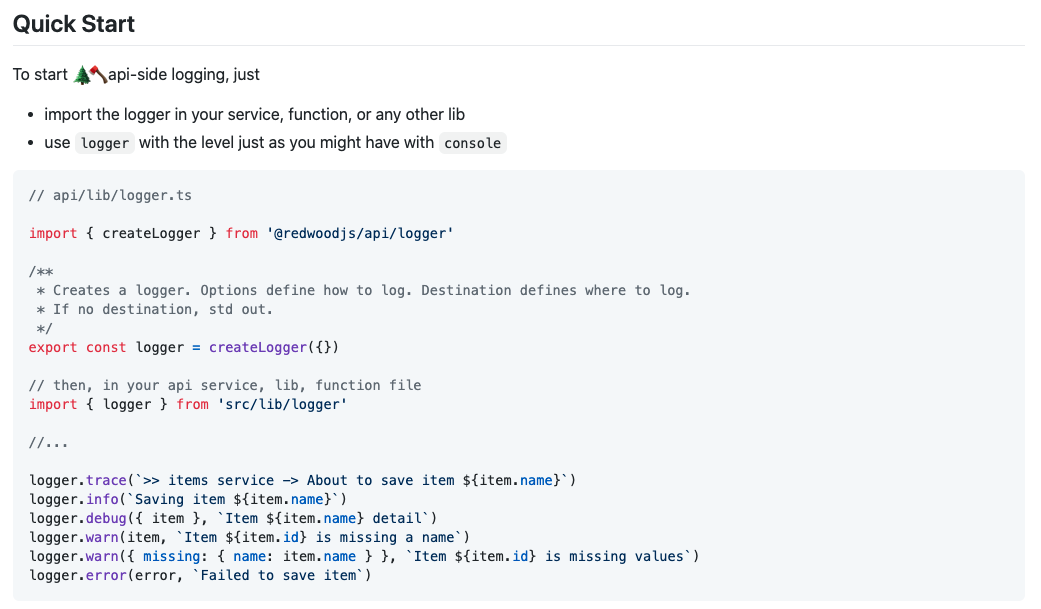
To manually upgrade an existing app:
If you are upgrading an existing RedwoodJS app and would like to include logging, you simply need to copy over files from the "Create Redwood Application" template:

* Copy `packages/create-redwood-app/template/api/src/lib/logger.ts` to `api/lib/logger.ts`. Required.

For optional Prisma logging:

* Copy `packages/create-redwood-app/template/api/src/lib/db.ts` to `api/src/lib/db.ts`. Optional.
* Copy `packages/create-redwood-app/template/api/src/lib/prisma.ts` to `api/src/lib/prisma.ts`. Optional.

The first file `logger.ts` defines the logger instance. You will import `logger` and use in your services, functions or other libraries. You may then replace existing `console.log()` statements with `logger.info()` or `logger.debug()`.

The second set of files `db.ts` and `prisma.ts` -- which are optional -- replace how the `db` Prisma client instance is declares and exported. It configures Prisma logging, if desired. See below for more information of Prisma logging options.
Note: if you want Prisma logging, these is a small correction to the README which I have included here (reference to prisma.ts).
Example
Debug logging on. Prisma logging at also at info and query levels.
api | [1616128547061] INFO (49614 on xxxx.local): Fetched a connection from the pool
api |     message: "Fetched a connection from the pool"
api |     target: "quaint::connector::metrics"
api | [1616128547117] DEBUG (49614 on xxxx.local): Query performed in 55 msec
api |     query: "SELECT \"public\".\"Post\".\"id\", \"public\".\"Post\".\"createdAt\", \"public\".\"Post\".\"title\", \"public\".\"Post\".\"body\", \"public\".\"Post\".\"authorId\", \"public\".\"Post\".\"editorId\", \"public\".\"Post\".\"publisherId\", \"public\".\"Post\".\"publishedAt\", \"public\".\"Post\".\"updatedAt\" FROM \"public\".\"Post\" WHERE \"public\".\"Post\".\"id\" = $1 LIMIT $2 OFFSET $3"
api |     params: "[5,1,0]"
api |     duration: 55
api |     target: "quaint::connector::metrics"
api | [1616128547118] DEBUG (49614 on xxxx.local): Fetching post A Forest
api |     payload: {
api |       "id": 5,
api |       "createdAt": "2021-03-18T05:32:39.623Z",
api |       "title": "A Forest",
api |       "body": "I hear her voice \\ Calling my name \\ The sound is deep \\ In the dark \\ I hear her voice \\ And start to run \\ Into the trees \\ Into the trees",
api |       "authorId": null,
api |       "editorId": null,
api |       "publisherId": null,
api |       "publishedAt": "2021-03-18T05:32:39.623Z",
api |       "updatedAt": "2021-03-18T05:32:39.623Z"
api |     }
api | POST /graphql 200 63.958 ms - 342
With Redaction
api | POST /graphql 200 396.269 ms - 2037
api | [1616128547055] TRACE (49614 on xxxx.local): In getCurrentUser
api | [1616128547055] DEBUG (49614 on xxxx.local): Info for user 3e278db4-c0ce-48f9-8c47-c01bbdaae482
api |     exp: 1616130132
api |     sub: "3e278db4-c0ce-48f9-8c47-c01bbdaae482"
api |     email: "[Redacted]"
api |     app_metadata: {
api |       "provider": "email",
api |       "roles": [
api |         "author"
api |       ]
api |     }
